Free Paraphrasing Tool by QuillBot: An Honest Review
If you write for a living, or even just write often, you know the moment. You have a sentence on the page. It says what you mean, but it lands wrong. Maybe it repeats a word from the paragraph above. Maybe it sounds clunky. Maybe it is technically correct but reads like a legal disclaimer. You stare at it, rewrite it three times, and end up back at the first version. That is the exact moment I open QuillBot.
I have been using the free paraphrasing tool by QuillBot for close to two years now, across blog posts, client work, academic drafts, LinkedIn articles, and cold emails. In that time I have run thousands of sentences through it, tested every mode, hit the free-tier limits more times than I can count, and pushed the tool into use cases it was never designed for. This is not a spec sheet. It is a working writer’s honest take on where QuillBot earns its reputation, where it falls short, and how to use it without becoming dependent on it.
Below is everything I have learned. I will cover what the tool actually does, which modes are worth using, how the free tier compares to the paid version, where it beats the competition, and where it quietly loses. If you are deciding whether QuillBot deserves a permanent spot in your workflow, you will have your answer by the end.
What Is the Free Paraphrasing Tool by QuillBot?
The free paraphrasing tool by QuillBot is an AI-powered rewriting tool that rephrases sentences, paragraphs, and short articles while keeping the original meaning intact. It is built by QuillBot, a company founded in 2017 that now sits inside the Course Hero education group. The paraphraser is the flagship feature, but the platform also includes a grammar checker, plagiarism detector, summariser, citation generator, and a translator.
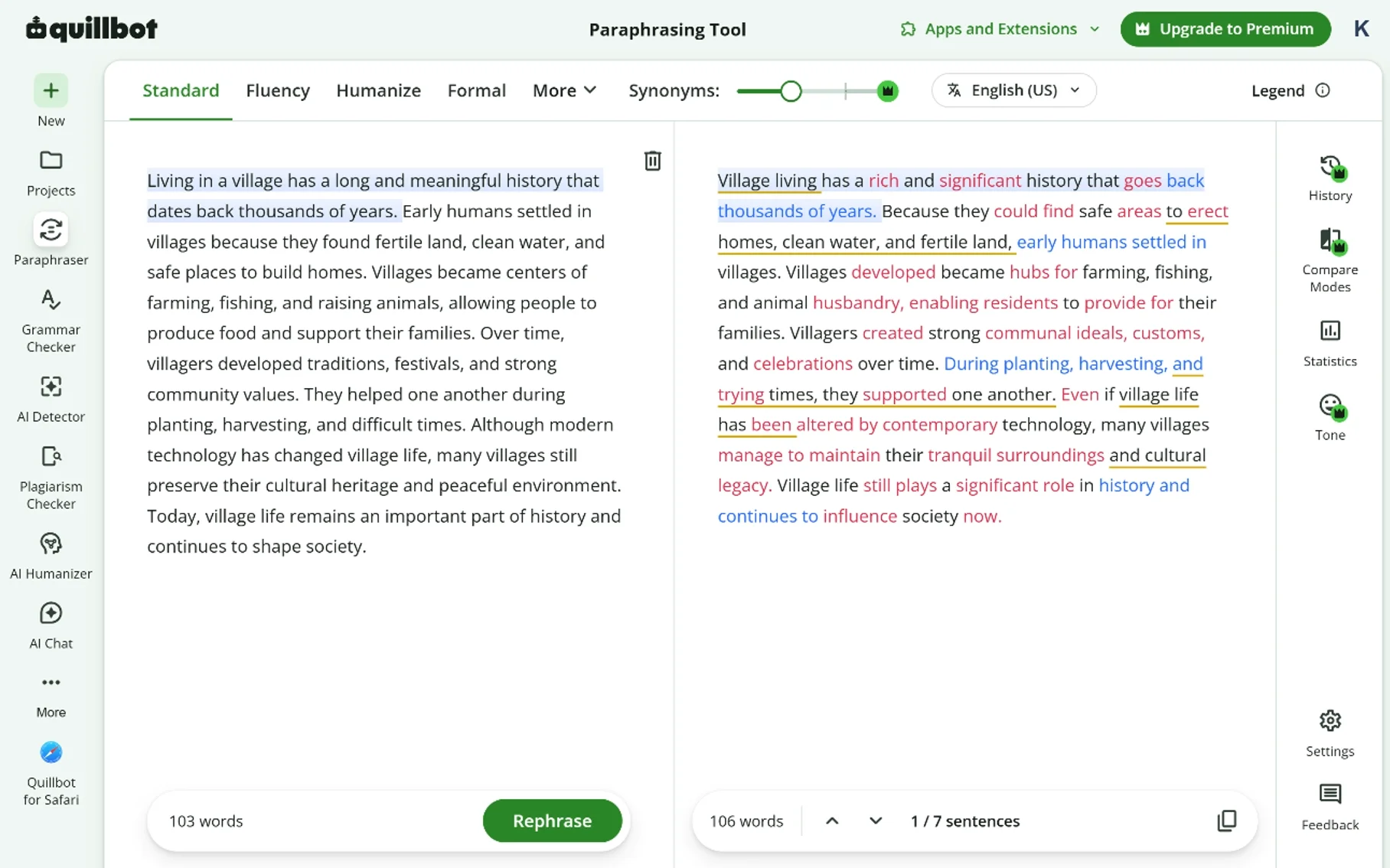
The tool works in a split-screen layout. You paste your text on the left, pick a mode, and the rewritten version appears on the right. Words the tool changed are highlighted, and clicking any word opens a list of alternative synonyms you can swap in manually. That last feature is what separates QuillBot from most rewriters I have tried — you keep control over the final wording instead of accepting whatever the AI decided.
The free tier gives you access to the core engine, two rewriting modes, and a 125-word cap per submission. The paid tier removes the word cap, unlocks the remaining modes, and turns off the ads. I have used both. The free version is genuinely useful. The paid version is a tool. There is a real difference between the two, and I will get into that further down.
Why I Started Using QuillBot in the First Place
I started using QuillBot because I was writing too much and rewriting even more. My earliest use case was not paraphrasing — it was breaking out of repetitive phrasing. When you write four articles a week on similar topics, you start reaching for the same sentence structures. QuillBot became my second opinion on wording. I would drop in a paragraph, look at the alternative it produced, and either take the whole thing, borrow one phrase, or ignore it entirely.
Over time, my use expanded. I started using it to smooth out awkward sentences in first drafts. To tighten wordy client feedback into cleaner reports. To rewrite passages that were technically correct but sounded stiff. Somewhere in the second year, I noticed I was using it less as a paraphraser and more as a sparring partner. That, honestly, is what a good writing tool should be.
Core Features of QuillBot’s Free Paraphrasing Tool
There are more features than most reviews mention, but only a handful I actually use every week.
- Two free modes: Standard and Fluency. Standard offers a balanced rewrite. Fluency prioritises grammar and readability. Both are usable. The other five modes sit behind the paywall.
- Word-level synonym control. Click any changed word and pick from a list of alternatives. This is the feature I would fight to keep if QuillBot removed it tomorrow.
- Slider for synonym intensity. A simple bar labelled from minimum to maximum changes. On the free tier this is limited, but even the range you get changes how aggressive the rewrite is.
- 125-word cap per submission. Restrictive for long articles. Workable for paragraph-by-paragraph editing.
- Freeze words. Lock specific terms so the tool leaves them untouched. Useful for brand names, technical terms, or keywords you need to preserve.
- Integrated grammar checking. A basic grammar layer runs alongside the paraphraser. Not as strong as Grammarly, but functional.
- Browser extension and Word add-in. I use the Chrome extension more than the website itself. It rewrites highlighted text in Gmail, Google Docs, and most web editors.
- Compare mode. Shows the original and rewritten versions side by side, with changes highlighted. Helpful for reviewing what actually got changed.
The Two Free Modes: Standard vs Fluency
The mode choice matters more than most new users realise. Here is how I actually use each one.
Standard mode is my default for general rewriting. It changes enough of the wording to feel like a proper rewrite without losing the shape of the original sentence. This is what I reach for when I want variation but not a full rework.
Fluency mode is what I use when the source text is rough. If a client sends me a draft with awkward phrasing, or if my own first paragraph feels stiff, Fluency mode smooths it out while making very few structural changes. It is the safest mode for professional writing where accuracy matters more than variety.
The paid modes — Formal, Simple, Creative, Expand, and Shorten — each solve a specific problem. Formal is genuinely useful for academic and business writing. Shorten is useful for cutting bloated paragraphs. Creative can be hit-or-miss. I do not think the paid tier is essential unless you write in more than one register regularly.
How I Actually Use QuillBot in My Workflow
This is the part most reviews skip. Owning a tool and using it well are different things. Here is my actual process.
- I write the first draft without any tool. Every time. If you start with a rewriter, you never develop your own voice.
- I read the draft back out loud. Any sentence that stumbles gets marked.
- I run the marked sentences through Fluency mode. One at a time. I do not paste in the whole article.
- I compare the output to my original. Roughly half the time, I use the QuillBot version. The other half, I take one phrase and rewrite the rest myself.
- I use the synonym slider on individual words. This is where the tool earns its place. Better word choice is often the difference between a good sentence and a great one.
- I never trust it on technical claims. If the sentence contains a statistic, a name, or a specific fact, I check the output word for word.
- I do a final read-through without the tool open. The tool has done its job by then. The last pass belongs to me.
That workflow has produced content that ranks, converts, and reads well. The key is treating the tool as a collaborator, not a replacement.
Who Actually Benefits From the Free QuillBot Tool
I have recommended QuillBot to more people than I can count. Not everyone got the same value out of it. These are the groups that consistently do.
- Students writing essays and research papers. Especially for reshaping their own notes into flowing academic prose. Not for copying anyone else’s work.
- Non-native English writers. The Fluency mode is a genuine equaliser for anyone whose first language is not English. It fixes phrasing without flattening voice.
- Bloggers and content marketers. Useful for varying sentence structure across long-form articles and refreshing older posts.
- Business professionals. Emails, reports, and internal documents benefit from a quick fluency pass before hitting send.
- Editors reviewing other people’s drafts. The compare view is a fast way to see whether your rewrite improved or damaged the original.
- Researchers translating dense material into accessible summaries. The tool handles the reshaping so you can focus on accuracy.
- Freelance writers producing at volume. Anything that shortens the drafting cycle by even 15 percent adds up over a year.
Where the Free QuillBot Tool Falls Short
I would not trust a review that only listed the good parts. Here is what I have run into.
- The 125-word cap breaks the flow for long articles. You end up submitting the same piece six or seven times. It works, but it is friction.
- Two free modes is not enough for real work. Formal and Shorten belong in the free tier. Their absence pushes serious users toward the subscription.
- The rewrites can flatten voice. If you have a strong personal style, QuillBot will occasionally sand off the edges that make your writing yours.
- Technical writing needs supervision. Any sentence with numbers, names, or specialised terminology needs a manual review. The tool does its best but is not infallible.
- Ads on the free tier are noticeable. Not deal-breaking, but present.
- The synonym suggestions are sometimes off. Around one in ten synonym options is wrong for the sentence context. Reading matters.
- It does not add ideas. If your original sentence is weak, the rewrite will be weak in different words. This is a limit of every paraphraser, but worth stating clearly.
Knowing these gaps has made me a better user of the tool. I now know exactly when to reach for it and when to close the tab and think for myself.
QuillBot vs Other Free Paraphrasing Tools
I have tested most of the major options. Here is how the field looks based on my direct experience.
| Tool | Free Word Cap | Free Modes | Sign-Up Required | Best For |
|---|---|---|---|---|
| QuillBot | 125 words | 2 | Optional | Sentence-level polish |
| SpellMistake | Effectively none | Multiple | No | Full-length articles |
| Paraphraser.io | 500 words | 2 | Optional | Short blog posts |
| Prepostseo | 1,000 words | 3 | Optional | Bulk rewriting |
| Spinbot | Medium | 1 | No | Not much I would publish |
| Grammarly Paraphraser | 500 characters | 3 | Yes | Grammar-first users |
QuillBot’s edge is the polish of its output and the granular synonym control. Its weakness is the word cap. If you write short paragraphs and want quality, QuillBot wins. If you write full articles and want volume, other free tools give you more room to work in.
The Free Tier vs QuillBot Premium
The upgrade question comes up a lot, so here is my honest take. I paid for Premium for eleven months. I let it lapse. I re-subscribed. I let it lapse again. That pattern says everything.
Premium is worth it if you write more than 10,000 words a week, need the Formal or Shorten modes regularly, or hate the word cap enough that it slows you down measurably. Premium is not worth it if you use the tool a few times a day, work mostly at the sentence level, and can survive with the two free modes.
The pricing sits around $9.95 to $19.95 per month depending on billing cycle and promotions. In 2026, expect regular offers on annual plans that bring the effective cost down to around $4 to $6 per month. I would only recommend the annual plan after using the free tier for at least a month. Most people overestimate how much they will use the paid features.
Is QuillBot Safe to Use for Academic Writing?

QuillBot is safe for academic writing when used to paraphrase your own notes, drafts, and summaries. It is not safe — and not ethical — when used to paraphrase another author’s published work without proper citation. That distinction is not about the tool. It is about academic honesty.
Universities in 2026 have caught up to AI writing tools. Most institutions now use detection systems that flag suspicious paraphrasing patterns alongside traditional plagiarism checks. QuillBot output can trigger these systems if you rely on it too heavily, especially in Creative or Formal modes. I have spoken to a few academics on this. Their consensus: use the tool for your own words, cite everything you borrow from others, and never let the output leave your review without a full read-through.
The tool itself is not the risk. Overuse is the risk.
SEO and Content Marketing Uses in 2026
Paraphrasing tools have a complicated relationship with SEO. Google has spent the past three years refining its systems to reward genuinely useful content and quietly demote thin rewrites. That has not made rewriters useless. It has made lazy use of rewriters useless.
When I use QuillBot for SEO work, I follow three rules.
- I never publish pure paraphrases. Every rewritten piece gets fresh statistics, updated examples, and new sections that were not in the source.
- I add related entities that the original missed. A post about paraphrasing tools should mention natural language processing, synonym replacement, semantic accuracy, and specific competitor names like QuillBot and Grammarly. This widens topical coverage.
- I let the tool do the mechanical work. The strategic thinking — what to add, what to remove, what angle to take — stays with me.
Rewritten content still ranks in 2026. The bar is just higher than it was three years ago.
A Real Before-and-After From My Own Writing
Here is a paragraph I wrote for a client last month, before and after a QuillBot Fluency pass.
Original: “Choosing a paraphrasing tool is not always easy because there are many options available and they all promise to do the same thing but the results can be very different depending on which one you pick.”
After Fluency mode: “Choosing a paraphrasing tool can be difficult because many options exist, and while they all promise similar results, the actual output varies significantly depending on your choice.”
Cleaner. Tighter. Same meaning. That is the exact kind of edit the tool handles well. Not glamorous, not transformative, but useful across thousands of sentences over a year.
Common Mistakes People Make With QuillBot
Watching other writers use the tool taught me more than watching myself use it. These are the patterns that hold people back.
- Pasting entire articles and accepting the output blindly. The tool is a scalpel, not a blender.
- Trusting the synonym suggestions without reading them. Around one in ten is wrong.
- Using it to disguise copied work. Wrong ethically, and no longer effective technically.
- Assuming Premium is required. For most writers, the free tier is genuinely enough.
- Ignoring the freeze-words feature. It is one of the most useful controls in the tool.
- Skipping the final read. A tool-assisted draft is not a finished draft.
- Comparing QuillBot to a full writing assistant. It is a paraphraser. Judging it against ChatGPT is judging a screwdriver against a toolbox.
How QuillBot Compares to AI Writing Assistants in 2026
The line between paraphrasers and general AI writing assistants has blurred over the past two years. Tools like SpellMistake, ChatGPT, Claude, and Gemini can rewrite text on request, and they do so with more flexibility than QuillBot. So why still use a dedicated paraphraser?
Three reasons, based on how I actually work.
First, speed for small edits. Opening QuillBot and clicking a mode is faster than writing a prompt for a general AI. Over the course of a day, that saves real time.
Second, predictability. QuillBot’s output is bounded. It rephrases and stops. General AI assistants sometimes add ideas, examples, or context you did not ask for. That is fine when you want it and frustrating when you do not.
Third, the synonym control. No general AI assistant gives you word-by-word alternatives with a click. That granular control still belongs to dedicated paraphrasers.
QuillBot is not the sharpest tool in the shed anymore, but it is the tool I still reach for first when the job is small and specific.
Frequently Asked Questions
Is the free paraphrasing tool by QuillBot actually free?
Yes. The free tier requires no payment and no credit card. It includes Standard and Fluency modes, the synonym slider at limited range, and a 125-word cap per submission. Premium features exist, but the free tier is genuinely usable on its own.
Can QuillBot output be detected as AI-generated?
Yes, in some cases. Detection tools in 2026 have improved significantly, and heavy QuillBot use can trigger flags, particularly in academic settings. The safest approach is to use the tool for polishing your own writing rather than disguising machine-generated or copied content.
Does QuillBot change the meaning of the original text?
No, not in most cases. In two years of daily use, meaning drift has been rare in Standard and Fluency modes. Creative mode is more aggressive and does occasionally shift emphasis. Always review the output, particularly for sentences containing statistics, names, or technical claims.
Is QuillBot suitable for long articles?
No, not on the free tier. The 125-word cap makes long-form work slow and repetitive. Premium removes the cap and makes long-article work practical. For free-tier users writing long content, a tool with a higher word limit fits better.
Can students use QuillBot without getting into trouble?
Yes, with one condition. Students can use QuillBot ethically to paraphrase their own notes, drafts, and summaries. Using it to disguise another author’s work is plagiarism regardless of how the sentences look afterwards. Always cite original sources, and always review the output.
Does QuillBot work in Google Docs and Microsoft Word?
Yes. QuillBot offers a Chrome extension that works in Google Docs, Gmail, and most web editors, and a Microsoft Word add-in for desktop users. Both give you access to the paraphraser without leaving your document.
Is QuillBot better than free alternatives like Paraphraser.io or Prepostseo?
Yes for polish and sentence quality. No for word volume. QuillBot produces cleaner sentence-level output but limits free users to 125 words per submission. Alternatives offer more room per submission but often lower output quality. Your best choice depends on whether you value depth or volume more.
Will QuillBot help my SEO rankings?
No, not directly. QuillBot rewrites your existing content, it does not improve its SEO on its own. Rewritten content ranks when it also adds new value — fresh data, updated examples, expanded coverage. Use QuillBot for the mechanical rewrite and do the strategic work yourself.
Is the paid version of QuillBot worth it?
Yes, but only for heavy users. Writers producing more than 10,000 words per week, working across formal and informal registers, or needing the Shorten and Expand modes will get value from Premium. Casual users will get most of what they need from the free tier.
Final Thoughts
The free paraphrasing tool by QuillBot has stayed on my toolbar for close to two years because it does one specific job well. It takes a sentence I am not satisfied with and gives me a version I can either use, borrow from, or reject. That is a smaller role than most reviews claim. It is also a genuinely useful one.
Do not expect QuillBot to write for you. Do not expect it to think for you. Do not expect it to hide copied work in a way that survives modern detection. Do expect it to sharpen sentences, smooth awkward phrasing, and give you a second opinion on word choice a hundred times a day if you need it.
If you write, and if you are willing to stay in the driver’s seat, QuillBot earns its place. Try the free tier first. Use it for a month at the sentence level. See whether it fits your workflow before spending on Premium. That is the honest recommendation from someone who has used the tool longer than most reviewers ever will.
Every writer eventually finds their own kit. QuillBot has stayed in mine because it respects the fact that the words on the page are still mine to choose. That, more than any feature list, is why I keep coming back.
You May Also Like
 AI Tools
Clever AI Humanizer: An Honest Review After Testing It Across Real Client Work
 AI Tools
Free Article Rewriter Tool by SpellMistake: An Honest Review After Months of Testing
 AI Tools
Free Article Rewriter by UploadArticle.com: What It Is, How It Works, and Why You Actually Need It
 Family and Relationships
How We Strengthen Our Relationship in 24 Hours: A Real Couple’s Guide to a Healthy Relationship
 Self-Improvement
How to Improve Yourself Every Day: 17 Small Habits We Use to Grow a Little Every Day
 Fun Questions
1500+ This or That Questions for 2026: From Silly Choices to Deep Conversations
 Uncategorized
160+ Silly School Jokes for Kids That Will Make the Whole Class Laugh
 Friendship Quotes
200+ Thinking of You Quotes to Make Someone Feel Remembered
 Personal Motivation Quotes